Showing posts with label BROWSING TIPS/TRICKS. Show all posts

Wednesday, 22 March 2017

BROWSING TIPS/TRICKS || Latest Glo Free Browsing Via Uc Browser Handler On Android And Pc, No Settings Required

Glo 0.0kobo free browsing has been around for sometime and its even blazing unlimited on the latest "one tap" N-VPN app that was lunched this week.

The latest addition to glo 0.0kobo free browsing is the use of UC browser handler app both on PC and android devices. While this can serve as an alternative on android devices, it is better to use the N-VPN app to power all applications on your device because this uc browser handler tweak only powers the UC Browser handler app. However, this UC handler tweak is better on laptop and its the only method that can be used with modem directly on PC, no need to connect to PC via your androids device tethering. This means that those without an android device but with PC can now connect using a modem, although it will only power the PC's UC Browser handler app. Let's get started...


Requirements

For android
√ android device
√ glo sim with zero data and airtime
√ Nairabit UC mini Mod for android      Go to download Page

Settings
No settings is required for android, just download and install the Nairabit UC Mini Mod and start browsing. It has been made that simple by Nairabit. 
For PC 
√ PC
√ glo sim with Zero data and airtime
√ UC mini handler for PC     download see settings below


UC Browser Handler Settings For Glo 0.00KB Free Browsing On PC

• Install and open the UC browser handler that was downloaded above
• Click Network Settings 
Double click on,
• Proxy type: REAL HOST
• Proxy server: redirect.glo.com
• Real proxy type: default or HTTP
• Real proxy port: 80
• Leave other fields as it is and save.


How To Download Large Files On Glo UC Browser Handler Tweak

To download large files both on android and PC UC Browser handler versions

• Visit  www. muchproxy . com

• Copy the download link of the file you wish to download then paste on the space given on the site.

• Hit go and your file would begin to download.

That's all, enjoy .

Note: THIS POST WAS COPY FROM NAIRABIT.COM

BROWSING TIPS/TRICKS || FREEDOM VPN FREE BROWSING ON ALL NETWORKS, ANDROID AND PC

Free and unlimited browsing is back  on all networks in Nigeria- MTN, Airtel, Glo, Etisalat, Swift and Multilinks and also most networks inAsia, the Middle East and Africa including Kenya's Safaricom, All courtesy Freedom VPN. Maybe this is the reason its browsing speed is slow and in some cases very slow.  This is an alternative for most of you that are already flexing N-VPN Free browsing on glo and etisalat.


Read : N-VPN free browsing on glo and etisalat


Freedom VPN works on both PC and android devices without any special settings . This Freedom VPN is easy to use and I will be showing you how.


Requirements
• Android device or PC or both
• Good Internet service
• Modem -  for PC only
•  Download Freedom VPN for  Android
 
•  Download Freedom VPN for PC


Android Settings for Freedom VPN Free Browsing 

• Install and open the Freedom VPN you downloaded above 

• Tap on Configure at the buttom 
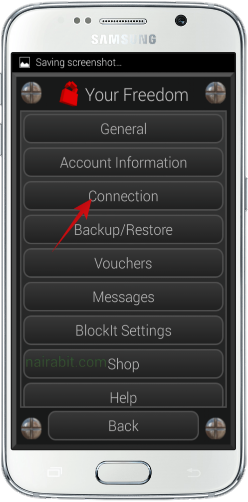
• Tap on Connection and wait for a few seconds for the connection configuration option to appear, then input

• Freedom Server: ems02.your-freedom.de


• Tweaks: select your network from the drop down menu, for this post, I have chosen Nigeria Airtel (Zain). You can choose MTN or Etisalat
• Connection Mode: DSN
• Port: 53
That's all, just tap on Back to go to the home screen and tap on connect. Wait while the app connects, when it does just minimize it and start browsing. 
PC Settings For Freedom VPN Free Browsing

• Register a free Freedom VPN account here
• Install and run the Freedom VPN for PC 
• Select account information and input your username and password in the required field
• Click on Configure
• Click on Connection 
• Freedom Server: ems02.your-freedom.de
Other alternative servers are

ems23.your-freedom.de

ems21.your-freedom.de

ems22.your-freedom.de

ems27.your-freedom.de

ems29.your-freedom.de
• Tweak: Nigeria MTN
• Connection Mode: DSN
• Port: 53

Go back and connect , then open your browser (Chrome, Opera, Mozilla etc) and configure it using

Proxy: 127.0.0.1
Port: 8080

Read how to configure browsers proxy on PC if you don't know how.


Like I said earlier, this tweak might be very slow, so just try it and see how fast it can get. If you are still confused, make use of the comment box below to tell us so we can help you.